

TreeSize Alternative for Analyzing Disk and Cloud Storage
Looking for a TreeSize alternative that analyzes both your hard drive and your cloud accounts? Air Cloud Analyzer brings local and cloud storage analysis into one application for Windows and Mac. Its interactive sunburst charts help you explore folders visually, understand what occupies space, and identify files worth reviewing.
TreeSize is an established choice for Windows storage analysis. Air Cloud Analyzer is particularly worth considering if your files are spread across multiple cloud services, you use macOS, or you prefer a circular, interactive view of your storage.
TreeSize vs. Air Cloud Analyzer: Key Differences
The right storage analyzer depends on where your files live and how you want to investigate them. This comparison focuses on Air Cloud Analyzer Pro and TreeSize Professional; check the current editions before purchasing.
| Feature | Air Cloud Analyzer Pro | TreeSize Professional |
|---|---|---|
| Desktop platforms | Windows and Mac | Windows |
| Local disk analysis | Yes | Yes |
| Direct cloud storage analysis | Supported cloud connections | Supported cloud and remote targets |
| Storage visualization | Interactive sunburst charts | Treemap, bar, and pie charts |
| Cloud provider examples | Google Drive, OneDrive, Dropbox, MEGA, Box, pCloud, S3 | Google Drive, SharePoint, S3, Azure |
| Large-file and duplicate analysis | Yes | Yes |
| Analysis by file type and date | Yes | Yes |
TreeSize supports cloud analysis, so the distinction is not simply “disk versus cloud.” Compare the exact providers, platforms, and workflows you need. Its Professional edition also offers scheduled scans, command-line automation, and advanced reporting.
Explore Storage with Interactive Sunburst Charts
A list of folder sizes tells you which folders are large. A visual map helps you understand how those folders fit together.
Air Cloud Analyzer’s interactive sunburst chart displays storage as concentric segments. The hierarchy shows how folders relate to one another, while segment size reveals where space is concentrated. You can navigate through folders visually to investigate the branches that need attention.
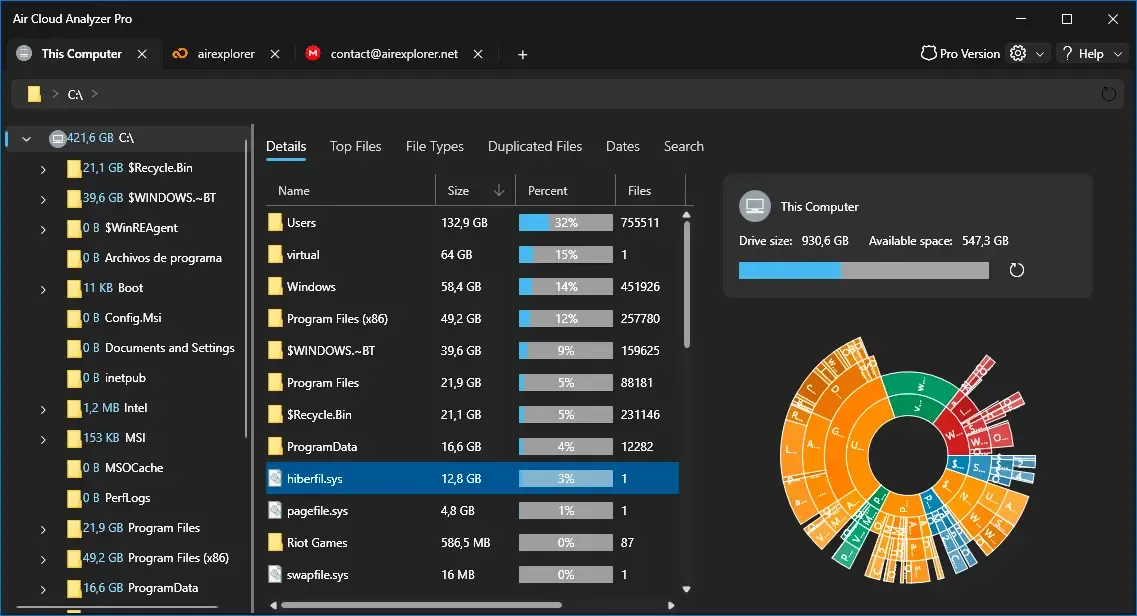
For example, a large “Projects” folder might contain several years of work. Exploring its sunburst segments helps you narrow the investigation to a particular project and then inspect its files. The same approach works when exploring a supported cloud account.
TreeSize also provides visual analysis, including treemap, bar, and pie charts. Its documentation does not list a sunburst among those chart types. The choice is therefore about which visualization you find easier to explore.
Analyze Cloud Storage Without Downloading Everything
Your computer’s synchronized folders may not represent everything stored in your cloud accounts. Selective sync can exclude folders, and online-only files can complicate the distinction between cloud usage and local disk usage.
Air Cloud Analyzer connects directly to supported cloud services, allowing you to investigate remote storage without downloading the entire account first.
This matters when your cloud contains years of backups, photos, or video files that would not fit comfortably on your laptop. You can review storage usage before deciding what to keep or remove.
Supported services include Google Drive, OneDrive, Dropbox, MEGA, Box, and pCloud. Consult the complete cloud compatibility list for your providers. You can also follow our guide to analyzing cloud storage and freeing up space.
Find Large Files Across Disks and Cloud Accounts
Storage cleanup is more productive when you start with files that make a meaningful difference.
Air Cloud Analyzer’s Top Files view helps you identify large files in local storage and connected cloud accounts. Video recordings, backup archives, and exported projects are common places to begin.
The detailed explorer provides folder context, while file type analysis shows which categories consume the most space. If videos dominate an account, reviewing small documents is unlikely to solve the problem.
Global search also helps you locate specific files across connected storage sources, reducing the need to search each account separately.
Review Duplicates and Older Files
Large files are only one source of clutter. Repeated uploads and forgotten copies can accumulate across accounts and drives.
Air Cloud Analyzer provides duplicate analysis to help you identify candidates for review. Before deleting a copy, check whether it serves a backup purpose or belongs to an active project.
Date analysis offers another way to investigate storage. Older files may include completed projects or outdated archives, but age alone does not make a file unnecessary.
Use these views together to make informed cleanup decisions. Review the Free and Pro feature comparison to confirm which tools your edition includes.
When Is Air Cloud Analyzer a Good TreeSize Alternative?
Air Cloud Analyzer is worth considering if you:
- Need a storage analyzer for Windows or Mac.
- Manage files across several supported cloud providers.
- Want to explore storage through interactive sunburst charts.
- Need large-file, duplicate, file type, and date analysis.
TreeSize Professional remains relevant for Windows workflows that prioritize scheduled scans, command-line automation, and advanced reporting.
Choose according to your actual accounts and tasks. To explore Air Cloud Analyzer, download the application, scan a local drive or connect a supported cloud account, and start with the sunburst chart to see where your space is going.