

PikPak and Air Cloud Analyzer: discover what takes up space and make better use of your cloud
Saving files in the cloud is convenient, but keeping them organized takes more than creating folders. Over time, videos, documents, and downloaded files accumulate, making it harder to understand what consumes the most space or where you saved something you need. Even an account with plenty of capacity can become a collection that is difficult to review.
PikPak and Air Cloud Analyzer work together to help you manage that growing collection. PikPak provides a place to store and access your files, while Air Cloud Analyzer lets you examine how that content uses your storage. Together, they help you understand your account, locate large files, and identify opportunities to recover space.
What makes PikPak useful?
PikPak offers features for saving content directly to the cloud and playing stored videos online. It also provides access across different devices through its applications and web interface. This is convenient when you want to browse a collection without keeping every file downloaded on each computer or mobile device. You can explore these capabilities on the official PikPak website.
For people who store videos, this approach has a practical advantage: an accessible library that does not require an equivalent amount of local storage. Training materials, recordings, and audiovisual resources can remain in your account, ready for you to access when you need them.
However, convenient storage also makes it easy to accumulate content. A folder can grow through new downloads, alternative versions, or resources you have already used. Alongside the ability to save files, it helps to have a way to review what you are keeping.
Turn your storage into useful information
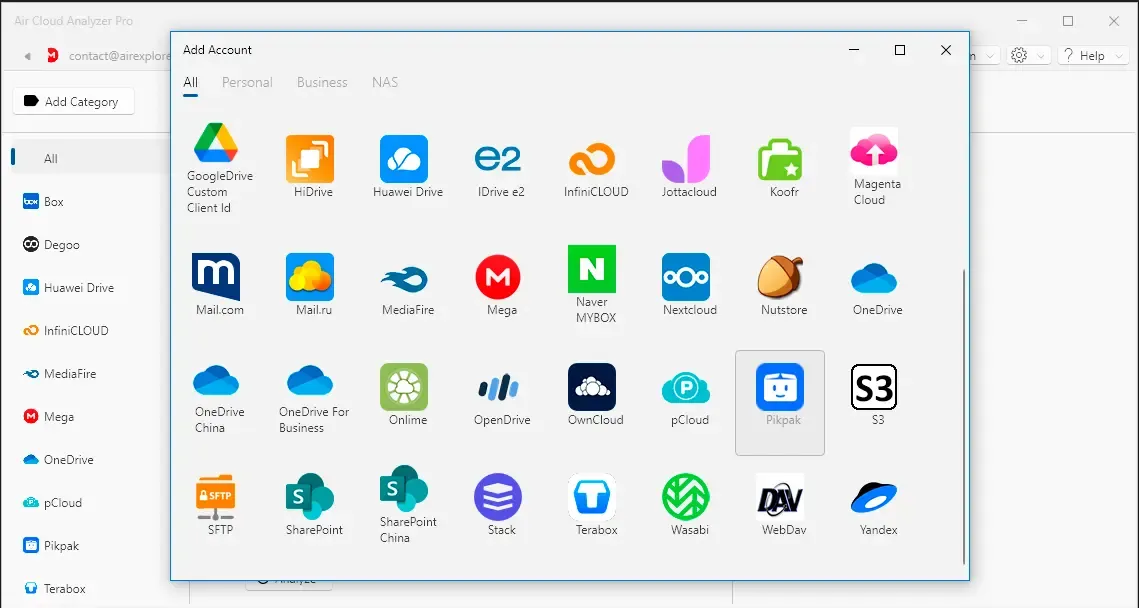
Air Cloud Analyzer supports PikPak and can analyze cloud storage without downloading all the files to your computer first. You can therefore examine your account without setting aside local disk space for a complete copy of its contents. PikPak appears in the list of supported cloud services.
The aim is to answer practical questions. Which folders take up the most space? Which individual files account for a large share of your storage? Do videos dominate your collection? Are there duplicate copies worth checking?
Those answers help you decide where to begin. When cleaning up an account, you do not need to spend equal time on every folder. You can focus your attention on the areas where reviewing unnecessary content could make the greatest difference.
Video: explore PikPak with Air Cloud Analyzer
The following video demonstrates how to add a PikPak account to Air Cloud Analyzer and start an analysis. You will see how to choose between examining the entire cloud account and focusing on a specific folder, then explore the results.
The demonstration covers the Details view and its sunburst chart, the size ranking in Top Files, the breakdown by file type, and duplicate review, including deleting selected duplicates from the program. It also shows how to search for specific content, such as videos or TXT files.
After watching the workflow, you can use each view to investigate a different aspect of your storage.
Understand your cloud through the sunburst chart
In Details, the sunburst chart provides a visual way to explore how files and folders share the occupied space. This is particularly helpful when your folder structure has several levels and a list of names does not clearly reveal where most of the content is concentrated.
Imagine that you keep recordings from several projects. A folder containing relatively few files might hold much larger videos than another folder with hundreds of items. The visual breakdown helps you recognize these differences and decide which part of your library deserves attention first.
Prioritize large files and compare content types
Top Files lists files from largest to smallest. This makes it easier to identify items whose removal, after review, could have a noticeable effect: an old recording, an archive you have already unpacked, or a project version you no longer need.
The file type view adds a different perspective by showing how videos, documents, and other formats contribute to your collection. These views support different decisions. One highlights individual files; the other helps you understand the overall composition of your storage and the kinds of content you tend to accumulate.

Review duplicates and find what you need
Repeated copies can appear when you save material in several folders or collect files from different sources. Reviewing duplicates helps you identify items that may be using unnecessary space. Before deleting a copy, check which version you want to retain and where it belongs. The Air Cloud Analyzer help center explains that duplicate identification depends on the information available from each provider.
Search is also useful for everyday organization. Finding videos or TXT files lets you review a particular group of content without opening every folder manually. This can be helpful when your files follow different naming conventions or are spread across several locations.
Make cloud maintenance a manageable habit
Reviewing your account periodically turns cleanup into a series of smaller tasks. Start with one folder, inspect the largest files, and decide what remains useful. With PikPak and Air Cloud Analyzer, understanding your storage becomes a practical first step toward keeping your cloud organized and making better use of its capacity.