

How to Free Up Space on Mega: Find Large Files and Duplicates Without Downloading Anything
Mega’s free plan gives you 20 GB of cloud storage, which feels generous, until the day you try to upload a file and get the “storage full” warning. The frustrating part is that Mega’s own interface doesn’t explain where your quota went. There’s no visual breakdown by folder, no ranking of large files and no duplicate detection. Deleting folders blindly is risky: you might remove something important and barely recover any space.
Air Cloud Analyzer was built for exactly this situation. It’s a desktop app for Windows and Mac that scans your Mega account — plus more than 30 other cloud services and your local drives, reading only file metadata such as name, size and date. Nothing is downloaded to your computer, so a full analysis of a huge account takes minutes, not hours.
Why your Mega storage fills up so fast
In most accounts, a handful of usual suspects are responsible for the mess:
- Automatic photo and video backups from your phone, often saved in full resolution.
- Duplicate uploads, when the same files are synced from a laptop, a phone and a work PC.
- Large one-off files: 4K videos, disk images, ZIP archives from old projects.
- Forgotten shared folders that still count against your quota.
Mega doesn’t offer tools to visualize this breakdown, which is why the space problem feels invisible until it’s too late.
See your whole account in one Sunburst chart
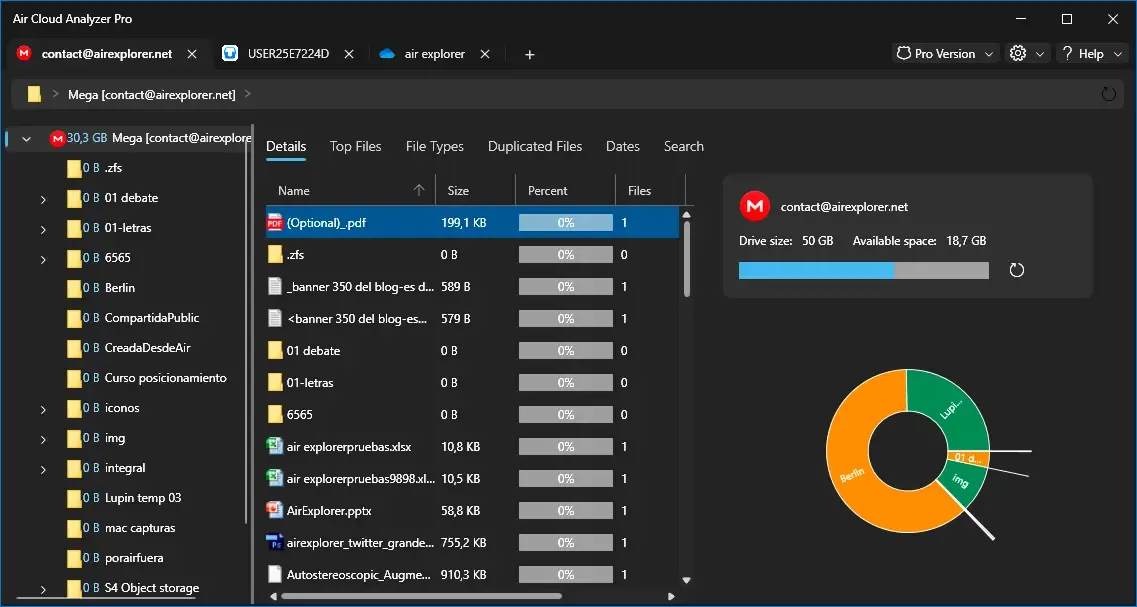
The first thing Air Cloud Analyzer shows after scanning Mega is an interactive Sunburst chart. Each ring represents a folder level, and the size of every segment is proportional to the space it occupies. Instead of opening folder after folder, you see at a glance which branch of your account is eating the quota.
Click any segment to zoom into it and drill down until you find the exact subfolder,or the single file, responsible. Color coding and scale make even small accounts easy to read.
Jump straight to the biggest files
If you want results fast, open the Top Files view. It lists the largest files in your entire Mega account, sorted by size, so you can decide in seconds whether that forgotten 8 GB video export or that ancient backup archive is still worth keeping. Deleting just two or three of these usually frees more space than cleaning hundreds of small documents.
Remove duplicates, even across clouds
Duplicates are the silent space killers. The same photo uploaded from your phone and your laptop, or the same backup copied to Mega and Google Drive “just in case”, can quietly double your usage.
Air Cloud Analyzer’s duplicate finder compares files across Mega, your other connected clouds and your local drives. It groups identical files so you can keep one copy and delete the rest with confidence, something no native cloud tool can do.
Find files you haven’t touched in years
Old files are rarely needed but almost never deleted. The Files by Date view lets you filter everything in your Mega account by last modification date, so you can quickly locate documents and archives you haven’t opened in years. Archive them locally or delete them, either way, your quota breathes again.

How to connect Mega to Air Cloud Analyzer
Getting started takes less than five minutes:
- Download Air Cloud Analyzer for Windows or Mac and install it.
- Click “Add account” and choose Mega from the list of supported services.
- Sign in using Mega’s official login protocol, your password is never stored on our servers.
- Start the scan and wait a few moments while the app reads your file metadata.
- Explore the Sunburst chart, Top Files, duplicates and date views to decide what to clean up.
Your data stays private
Because the app works directly from your desktop, your files never pass through third-party servers. Air Cloud Analyzer uses each service’s official authentication protocols, reads only metadata, never file contents, and stores nothing externally. For privacy-conscious Mega users, that’s an essential guarantee.
Conclusion: clean Mega in minutes, not hours
Running out of Mega storage doesn’t mean you need to pay for a bigger plan. In most cases, a small number of large files, duplicates and forgotten archives are taking up a huge share of your quota, you just need the right tool to see them.
Download Air Cloud Analyzer, connect your Mega account and get a complete visual map of your storage today. And if you also need to transfer or sync files between clouds once you’ve cleaned up, take a look at Air Explorer, our companion app for moving data between services.